
Made yours
Give it a name, pick how it walks, and choose light or dark.
A tiny companion lives on your screen and looks after you: water, stretches, eye rests and calm moments, asked kindly.
Free while in beta · Windows 10 and 11 · or download the installer
Every companion takes the same good care of you. They just do it in their own way.
Moves: strolls
The gentle nudger
Best at: reminding you to rest
"Long day? Let's stretch, then you can get back to it."
Your companion strolls along the taskbar and asks kindly when it is time. Done, Later or Skip: you always decide.

Press one to see how your companion asks.
Ask for help the way you would ask a friend. It answers in its own voice, and it can start things for you.
Hoodie Cat
A demo with sample replies. In the beta, chat is optional and uses your own AI account; you choose your companion's tone and style. Reminders, focus and calm work without it.
Lumling fits around your day instead of interrupting it.
9:00
A friendly hello when you start your computer, and a fortune cookie to open once a day.
10:00
Start a focus session from the right-click menu. Your companion keeps time, then sends you on a break. Need something simpler? A plain timer or a quick reminder.
12:30
Presenting, gaming, on a call or sharing your screen? Your companion steps aside and comes back after.
15:00
Time to stand, stretch and rest your eyes. Water keeps counting toward today's goal.
16:30
Calm practices, right beside your companion.
18:00
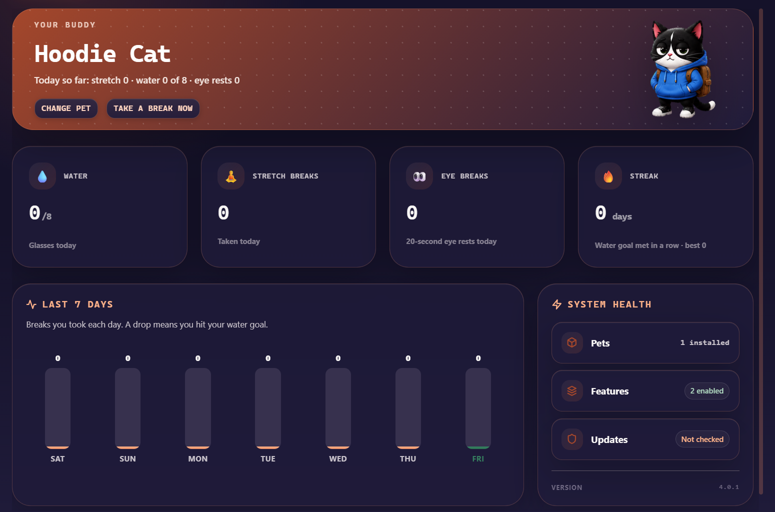
Water, stretches, eye rests and your streak, with the last seven days beside them.
Away from your desk? Reminders wait for you. Need quiet? Pause them for an hour.
Give it a name, pick how it walks, and choose light or dark.
Meet your water goal a few days running and the streak starts to matter.
No account, no ads. Your habits stay on your computer, and every feature has its own off switch.
Yes. The beta is free while we collect feedback. Any paid plans later will be optional.
They all give the same reminders and tools. Each one looks and moves in its own way, so pick the one you would like to see all day. You can switch any time.
No. It waits while you are away, hides for fullscreen apps and calls, and every reminder can be snoozed or skipped.
Your wellness data stays on your computer and there is no account. Lumling sends crash reports with personal details removed and, only if you say yes, one anonymous summary a day. The privacy policy has the details.
No. Reminders, focus sessions, timers and calm practices all work without one. Chat is optional and, in the beta, uses an AI account you connect yourself.
Yes. Download the installer from this page. It keeps itself up to date. Until the beta is signed, Windows may show "Windows protected your PC": choose More info, then Run anyway. Install either the Store version or the installer, not both.
Not yet. Lumling is Windows only for now. A Mac version is planned after the Windows beta.
The user guide explains every feature and where to find it. In the app, right-click your companion and choose Help & guide.
Right-click the Lumling icon in the system tray and choose Quit.